


Phone Tracker
3.732.00 Reviews
App Specs
- Version
- 1.2.0.0
- Updated On
- License
- Free
- Downloads
- 1,000,000+
- Developer
- CV.Nanda Pratama Mandiri
- Categories
- Maps & Navigation
- Platform
- Android
Screenshots
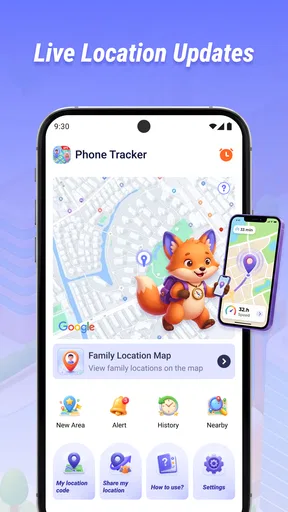
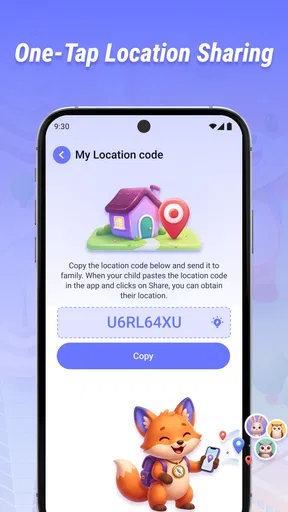
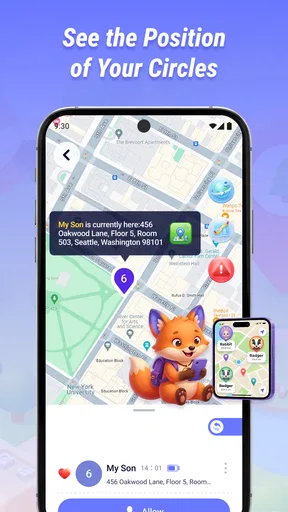
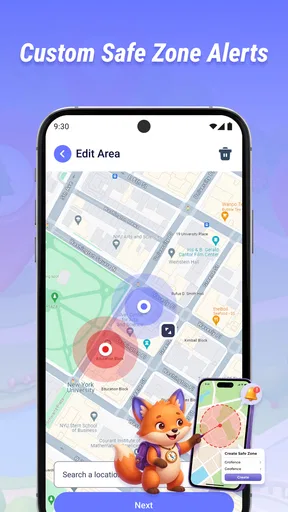
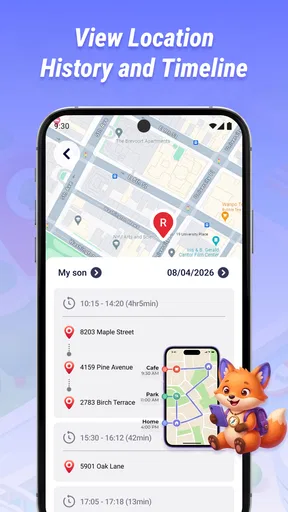
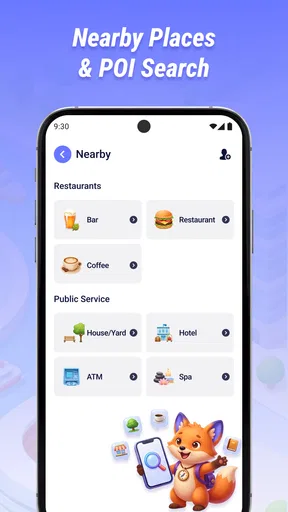
 Analysis by AppCompare
Phone Tracker is easiest to judge by the moment you actually need it: someone is travelling, plans have shifted, and a quick message asking “Where are you?” is no longer the most useful way to coordinate. This free maps and navigation app from CV.Nanda Pratama Mandiri is built around sharing a phone’s real-time location. I see the appeal in that focused idea, but I would treat it as a practical coordination aid—not as a complete navigation suite or a substitute for talking to the person you are tracking.
Start with a clear, everyday need
Before installing a location-sharing app, I would think about the exact problem I want it to solve. Is a family member trying to find the right pickup point? Are friends arriving separately at a crowded venue? Is someone travelling between familiar stops and hoping to avoid repeated check-in messages? When the answer is specific, sharing a phone’s position can make coordination simpler. If the concern is vague, or nobody involved wants to share, a tracker is unlikely to make the situation better.
For a realistic example, imagine meeting a friend at a busy station after work. You agree on the main entrance, but they are delayed and the crowd makes phone calls inconvenient. A shared location may help you see whether they are approaching the station or still some distance away. It will not tell you which exit they chose, so a quick message naming a landmark still matters. That combination—map for broad progress, conversation for the last few details—is the most useful way I would approach this kind of tool.
From “Where are you?” to a shared plan
I like to begin with the people and purpose, not the screen: a useful location share starts with both sides knowing what they are coordinating and when the check-in is over. This section follows that small but important setup, because a clear agreement can prevent confusion later. From there, the practical question is which kind of map or messaging tool best suits the handoff.
Start with agreement, not the map
The most important first step is a social one: decide who will share a location, with whom, and for what purpose. A tracker is useful when everyone involved understands the arrangement. Before using Phone Tracker, I would tell the other person why I want the location and when we will stop relying on it. That avoids turning a simple pickup or check-in into uncomfortable, unexplained monitoring.
This is especially relevant for families, friends meeting in a busy area, or a group coordinating a journey. The app’s purpose is clearest when location is shared willingly and helps answer a specific question, such as whether someone is close to the meeting point. If your need is private turn-by-turn directions for your own trip, a conventional navigation app is a better starting point.
Set up the handoff before anyone leaves
A real-world workflow should begin while both people can still talk. Agree on who is sharing, who needs to see the location, and what to do if the view is delayed or unavailable. Then install the app on the phone that will share its position and make sure the intended recipient knows how the two of you will coordinate. These small preparations matter more than they sound: they keep a location tool from becoming the only plan.
Worth Reading Before You Choose

EA SPORTS FC Mobile 26 Is a Bigger Football Game, but It Takes Time

Flipboard Shows What News Apps Must Do Beyond the Feed

Switching to Android Auto Means Rethinking Your Driving Routine

Google Calendar Makes a Crowded Week Easier to Manage

Ludo King Makes the Most of the Minutes Between Plans

Baby Panda World Brings Quick Play to Modern Phones, but Its Game Library Feels Busy
I would also arrange a fallback, such as a text or call at a clear checkpoint. That is useful on a school pickup, a crowded event, or a journey with several stops. If the other person’s phone is out of battery or the location is not updating as expected, you still have a way to reconnect. Real-time sharing can reduce repeated check-ins, but it cannot guarantee that every handoff will be smooth.
Use a simple check-in rhythm
One practical detail is to agree in advance on what counts as “close enough” and when you will switch back to direct contact. If you are waiting outside a venue, for instance, a shared map may help you decide whether to stay put or move toward a familiar entrance. Once the person is nearby, a short message is often more useful than watching the map and guessing which direction they will take. This keeps the app in a supporting role rather than letting it dictate every small decision.
For journeys with several stops, I would avoid expecting the recipient to monitor the screen continuously. Agree on a useful checkpoint—such as reaching a station or leaving a meeting—and use a message if the plan changes. That reduces distraction for the person travelling and gives the person waiting a clear moment to reassess. It is a small workflow choice, but it can make location sharing feel considerate instead of demanding.
Follow the location, then confirm the destination
Once sharing is underway, use the location as context rather than treating it as a promise of exact arrival time. For example, if a friend is crossing town to meet you, seeing their position can help you choose whether to wait at the entrance or move to a more convenient spot. I would still confirm the final meeting point in a message; a map position does not explain whether someone is walking around a block, waiting at a stop, or looking for the right entrance.
That distinction is one of the app’s practical trade-offs. Its central job is seeing a shared position, not replacing the conversation that makes the position useful. In unfamiliar places, a short message with a landmark can resolve confusion faster than repeatedly interpreting a moving marker. When a plan changes, update the person directly instead of assuming the map alone communicates the change.
Close the loop after the meetup
When the task is done, make the end of sharing part of the plan. If you only needed to coordinate one pickup or meeting, say so and stop using the location for that purpose. This clear finish is considerate and makes the arrangement easier to accept next time. It also prevents a temporary convenience from quietly becoming an open-ended expectation.
For recurring routines, I would agree on the occasions when sharing is genuinely helpful instead of keeping it running by default. A shared location can make coordination less fiddly, but it should not become a substitute for trust or a routine demand for proof. That boundary is not an extra feature; it is simply part of using a tracker responsibly.
How Phone Tracker fits among navigation choices
I judge Phone Tracker by the job it is meant to do, rather than by expecting it to replace every map on a phone. Here I compare a continuing shared location with the simpler alternatives of a one-time pin or turn-by-turn directions, so you can choose the least complicated option that still gets everyone to the meeting point.
A focused tool, not a route planner
Compared with the usual alternatives in maps and navigation, Phone Tracker has a narrower purpose. A standard navigation app is usually the better choice when you need directions, route options, or guidance to a destination. A messaging app may be enough when you only need to send a one-time location or explain where to meet. Phone Tracker makes more sense when the important task is keeping a shared view of someone’s real-time location during coordination.
That focus can be an advantage: you are not choosing a route-planning tool for a job that is really about keeping people in sync. But it also means I would not make it my only travel app. If you are driving somewhere unfamiliar, use a navigation product designed to guide your own journey, and use location sharing only as a companion for meeting or checking in.
Who is likely to find it useful
I can see it fitting people who regularly coordinate in person and prefer a location view to a stream of “I’m nearly there” messages. A family arranging a pickup, friends converging on a large venue, or a group trying to find one another after separating are plausible use cases. The strongest case is a short, agreed task with a clear person sharing and a clear person receiving.
It is less suitable if you want a full navigation toolkit, need detailed route planning, or are uncomfortable sharing a phone’s position. It is also a poor choice for anyone expecting location data to settle every question about another person’s progress. A map can help answer where a phone appears to be; it does not explain what its owner is doing or whether a plan has changed.
Check compatibility and expectations
The app is listed for Everyone and supports Android 7.0 or later. Its current release is version 1.2.0.0, so anyone considering it should check that their device meets the minimum system requirement before making it part of a shared routine. The developer is CV.Nanda Pratama Mandiri.
It has an average rating of 3.7 from around 4.2 thousand ratings, and more than a million installs. I take those figures as context rather than a guarantee that the experience will suit every phone or household. For a simple test, try it first with someone you trust during a low-stakes meetup, before depending on it for a time-sensitive pickup or an unfamiliar journey.
Choose the right tool for the handoff
A useful way to decide is to ask how many steps the coordination actually needs. If one person only has to send a point on a map once, a message may be quicker and easier for the recipient. If both people need directions to a destination, a route-planning app is the more direct choice. A dedicated tracker is worth considering when the shared position itself is the useful part of the handoff, rather than a one-time pin or a route instruction.
That distinction matters for groups, too. A location view can help people regroup after splitting up, but it does not necessarily replace choosing a single meeting point or deciding who will contact whom. I would keep the plan simple: name the place, identify who is sharing, and agree on what happens if the map stops helping. This avoids turning a small meetup into a complicated process involving several apps and assumptions.
Where the workflow can break
Even a sensible plan can become unreliable if a phone is unavailable, the shared position stops being useful, or people interpret the arrangement differently. I look at those weak points as part of the workflow, then consider how a direct check-in and a clearly agreed boundary can keep a small delay from becoming a larger misunderstanding.
Live location still depends on the phone and the people
The phrase “real-time” can encourage a false sense of precision. In practice, a location-sharing workflow depends on the phone being available and the person sharing it choosing to participate. If the position seems out of date, do not keep making decisions from the map as though it were definitive. Switch to a call or message, confirm a landmark, and agree on the next check-in.
There is also a handoff problem when the person who needs the location has not prepared in advance. Sending someone an app name at the moment you are already separated adds steps exactly when you have the least patience for them. I would set up the arrangement before leaving, make sure both people know what they are expected to do, and keep a simple fallback communication method ready.
Consent and boundaries are part of the setup
A location-sharing app is only helpful when the arrangement is understood. I would not use it to follow someone without their knowledge, and I would avoid treating a missed update as evidence of wrongdoing. For a child, older relative, or anyone who relies on a helper, explain the purpose in language they understand and revisit the arrangement as circumstances change. A tool that is meant to reduce worry can have the opposite effect if people do not agree on its limits.
For a one-off situation, a temporary message with a location may be more appropriate than adding another app to both people’s routines. For regular coordination, a dedicated tracker may feel more convenient, provided everyone is comfortable with it. The right choice depends less on the word “tracker” and more on how often the need arises and whether sharing is mutual and clear.
My verdict after tracing the whole journey
Phone Tracker is most compelling when a specific real-world task begins with a shared plan and ends with a confirmed meetup. It can make the middle of that process easier: instead of repeatedly asking for progress, the people involved can use a live location as a practical reference. Its focused role is also its limitation; it should not be mistaken for navigation, a safety guarantee, or a replacement for communication.
I would recommend giving it a try if you and the other person have a recurring, consensual need to coordinate by location and both are comfortable using a dedicated app. Start with a low-pressure situation, agree on a fallback, and close the sharing arrangement when the task is finished. If you only need directions or an occasional location pin, your usual maps or messaging app may be simpler. For the right shared workflow, though, this free app offers a straightforward idea worth testing.
Pros
- Can help locate a misplaced phone when location services are enabled.
- Location sharing can make coordinating with family or friends easier.
- May provide useful peace of mind during trips or daily commutes.
- A tracker can help identify a phone’s last known location.
- Useful for keeping track of devices you own or have permission to monitor.
Cons
- Accurate tracking depends on GPS
- network coverage
- and battery power.
- Location access must be enabled and may increase battery use.
- Tracking someone without their consent raises serious privacy concerns.
- Background location access may involve sensitive data permissions.
- Features and reliability can vary by device
- operating system
- or plan.
FAQs for Phone Tracker
What does Phone Tracker do?
Phone Tracker is a location-tracking app designed to help users view the location of people or devices, depending on the app’s features and setup. The exact tools can vary by version, so check its store listing before downloading. Location sharing generally requires the other person’s consent, compatible device settings, and an active internet connection; it should not be treated as a way to secretly monitor someone.
Does Phone Tracker work on Android and iPhone?
Compatibility depends on the specific Phone Tracker app, since several apps use similar names and may support different platforms. Check the Google Play or Apple App Store listing for supported devices, operating-system requirements, and any differences between Android and iOS versions. Some features may also depend on permissions, account settings, or services that work differently across platforms.
Does Phone Tracker need an internet connection and location permissions?
In most cases, a tracking app needs location access on the device being shared and an internet connection to send updates to other users. Accuracy and update frequency can vary with GPS reception, Wi-Fi or mobile data, battery-saving settings, and whether the app is allowed to run in the background. Review the permission prompts and privacy information before enabling location access.
Can I use Phone Tracker to locate someone without their knowledge?
Location tracking should be used transparently and with the person’s permission. Phone Tracker should not be used to secretly monitor another person, and app features may require participants to install the app, sign in, and agree to share their location. Rules on tracking vary by jurisdiction, so obtain clear consent and use the app only for lawful purposes, such as voluntary family or device sharing.
Is Phone Tracker free, and what should I check before downloading it?
Pricing and available features depend on the particular app listing. It may be free to install while offering subscriptions, in-app purchases, or limits on certain tools. Before downloading, verify the developer and recent reviews, review the privacy policy and data disclosures, check subscription terms and cancellation instructions, and confirm that the app requests permissions that make sense for the features you intend to use.


